The ISFORMULA function was officially introduced with Excel 2013, but thanks to Modern Functions Update (MFU) you can now run it on your Excel 2007 & 2010 versions. It works exactly as its original Microsoft counterpart.
Description
The ISFORMULA function checks whether a referenced cell contains a formula and returns TRUE if it does, or FALSE if it contains a constant value, text, or is empty.
This is particularly useful for:
- Auditing: Quickly identifying which cells in a spreadsheet contain formulas versus hard-coded values.
- Quality control: Verifying that all cells in a range are properly formula-driven.
- Error prevention: Highlighting cells that should contain formulas but have been overwritten with static values.
- Documentation: Creating visual indicators for formula cells in complex models.
Syntax
=ISFORMULA(reference)
| Argument | Description |
|---|---|
reference | A reference to a single cell you want to check. |
Examples
Basic Usage
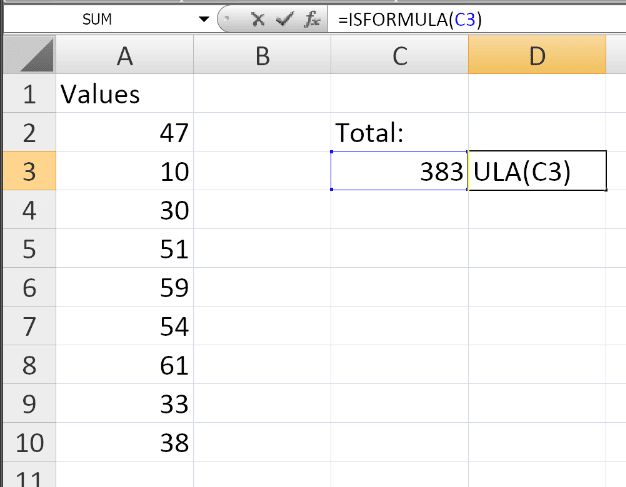
If cell C3 contains the formula =SUM(A2:A10), then:
=ISFORMULA(C3)
Returns: TRUE
If cell A2 contains the value 47, then:
=ISFORMULA(A2)
Returns: FALSE
With Conditional Formatting
You can use ISFORMULA with Conditional Formatting to visually distinguish formula cells:
- Select a range (e.g.,
A1:D100) - Go to Home → Conditional Formatting → New Rule
- Select “Use a formula to determine which cells to format”
- Enter:
=ISFORMULA(A1) - Set a format (e.g., fill color or font color)
- Click OK
Now all cells containing formulas will be highlighted.
With Other Functions
Combine ISFORMULA with IF to create custom messages:
=IF(ISFORMULA(A1), "This cell contains a formula", "This cell is static")
With FORMULATEXT
Use both functions together for a complete audit:
=IF(ISFORMULA(A1), FORMULATEXT(A1), "No formula")
This returns the formula text if it exists, or a message if it doesn’t.
Practical Use Cases
| Scenario | Benefit |
|---|---|
| Spreadsheet auditing | Quickly scan large models to find which cells are formula-driven |
| Data validation | Ensure that all input cells are not accidentally overwritten |
| Template creation | Verify that templates still contain formulas in the right places |
| Error detection | Identify cells that were incorrectly hard-coded |
| Training materials | Show which cells contain formulas for learners |
Notes
- ✅ Fully tested – The implementation in Modern Functions Update works identically to Microsoft’s original function introduced in Excel 2013.
- ✅ The function is fully compatible with Excel 2007, 2010, and all later versions.
- ℹ️
ISFORMULAworks with both relative and absolute references. - ℹ️ If the reference is to a cell that contains an error (e.g.,
#N/A,#DIV/0!),ISFORMULAstill returnsTRUEif the error originates from a formula. - ℹ️ A cell with an array formula will return
TRUE.
See Also
FORMULATEXT– Returns the formula as a text stringIFNA– Handles#N/Aerrors gracefully