The Insert Today is a unique feature introduced by Modern Functions Update (MFU) that does not exist in any version of Excel. You can now run it for free on your Excel from 2007 onward, including 365 and 2024 versions. This feature add the current date inside the selected cell(s).
Description
The Insert Today feature inserts the current date into the selected cell or cells with just one click. It’s a simple time-saver that eliminates the need to type the date manually or use keyboard shortcuts.
This is particularly useful for:
- Timestamping: Quickly add today’s date to records, logs, or entries
- Date stamps: Mark when data was entered or updated
- Daily reports: Add the current date to report headers or footers
- Data entry: Speed up form filling and repetitive tasks
- Tracking: Keep track of when information was added
How to Use It
- Select the cell or range of cells where you want the date to appear
- Go to the “Modern Functions” or “New Functions” tab on the ribbon (the name changes dynamically according to your Excel version)
- Click on the “Insert Today” button
- The current date is inserted into all selected cells
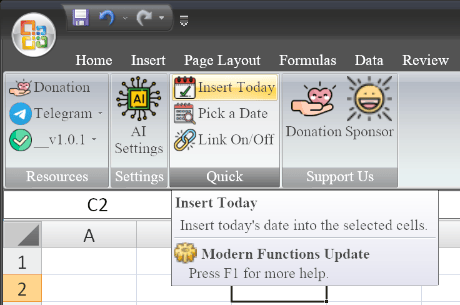
Key Features
- ✅ Single click – No formulas, no typing, no keyboard shortcuts to remember
- ✅ Works on multiple cells – Select a range and insert the date in all cells at once
- ✅ Static date – Inserts the actual date as a value (not a formula), so it won’t change
- ✅ Formatting preserved – The date uses your default Excel date format
- ⚡ you can add it on your Quick Access bar
Adding to Quick Access Toolbar
The Insert Today feature can be easily added to your Quick Access Toolbar for even faster access:
- Right-click on the “Insert Today” button on the ribbon
- Select “Add to Quick Access Toolbar”
- The button now appears on your Quick Access Toolbar for one-click access at all times
This is especially useful if you frequently need to insert the date and want it available regardless of which ribbon tab you’re on.
Example Use Cases
| Scenario | Why It’s Useful |
|---|---|
| Data entry logs | Quickly timestamp each new record |
| Daily reports | Add today’s date to report headers |
| Timesheets | Mark the current date for attendance or tasks |
| Invoice tracking | Date when invoices are created or processed |
| Meeting notes | Add the date to meeting minutes |
| Quality checks | Record when inspections were performed |
Comparison with Other Methods
| Method | Steps | Speed |
|---|---|---|
| Insert Today (MFU) | 1 click | ⚡ Fastest |
| Ctrl + ; (shortcut) | Keyboard shortcut | ⚡ Fast |
| =TODAY() formula | Type formula | Slower |
| Manual typing | Type the date | Slowest |
Notes
- ✅ The feature inserts a static date – it will not update automatically (unlike the
=TODAY()formula). - ✅ The date format follows your system’s regional settings.
- ✅ Works on single cells or multiple selected cells.
- ✅ The feature is available in all versions of Excel from 2007 onward.
- ℹ️ Insert Today is a unique MFU feature not found in any Excel version.