The IF.BETWEEN function is a unique feature introduced by Modern Functions Update (MFU) that does not exist in any version of vanilla Excel. You can now run it for free on your Excel from 2007 onward, including 365 and 2024 versions.
Description
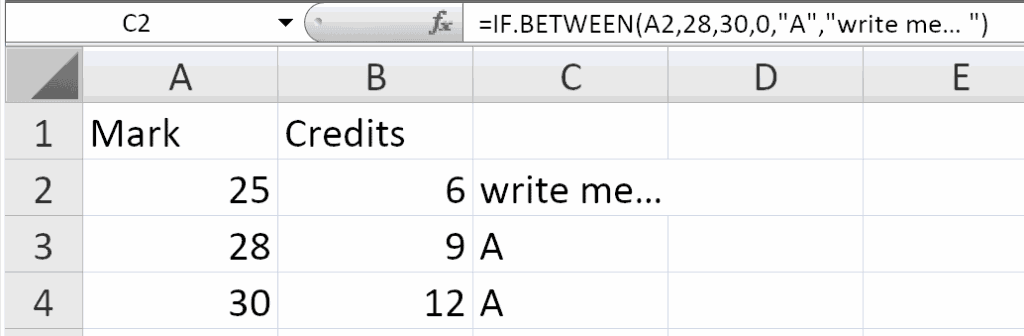
The IF.BETWEEN function checks whether a value falls between two boundaries and returns a specified result. The order of the boundaries does not matter – the function automatically determines the lower and upper bounds.
This is particularly useful for:
- Data validation: Check if values fall within an acceptable range
- Tiered pricing: Categorize values into different price bands
- Performance evaluation: Determine if a metric is within target range
- Quality control: Identify values that are within specification limits
- Reporting: Create conditional results based on value ranges
Syntax
=IF.BETWEEN(value, boundary1, boundary2, [exclusive], [valueIfTrue], [valueIfFalse])
| Argument | Description |
|---|---|
value | Required. The value to test. |
boundary1 | Required. The first boundary value. |
boundary2 | Required. The second boundary value. |
[exclusive] | Optional. Specifies whether boundaries are included. 0 (default) = inclusive, 1 = exclusive. |
[valueIfTrue] | Optional. The value to return when the condition is true. If omitted, returns TRUE. |
[valueIfFalse] | Optional. The value to return when the condition is false. If omitted, returns FALSE. |
Important Notes
- The order of boundaries does not matter – the function automatically determines the lower and upper bounds.
- Inclusive (default) means the boundaries are included in the range:
boundary1 <= value <= boundary2. - Exclusive means the boundaries are excluded from the range:
boundary1 < value < boundary2. - If
valueIfTrueandvalueIfFalseare omitted, the function returnsTRUEorFALSE. - You can use text, numbers, or dates as boundaries.
Examples
Basic Usage – Inclusive (Default)
To check if a value is between 10 and 20 (including 10 and 20):
=IF.BETWEEN(15, 10, 20)
Returns: TRUE
=IF.BETWEEN(10, 10, 20)
Returns: TRUE (inclusive)
=IF.BETWEEN(20, 10, 20)
Returns: TRUE (inclusive)
Exclusive Boundaries
To check if a value is strictly between 10 and 20 (excluding 10 and 20):
=IF.BETWEEN(15, 10, 20, 1)
Returns: TRUE
=IF.BETWEEN(10, 10, 20, 1)
Returns: FALSE (10 is excluded)
=IF.BETWEEN(20, 10, 20, 1)
Returns: FALSE (20 is excluded)
Returning Custom Values
To return “Within range” or “Out of range”:
=IF.BETWEEN(15, 10, 20, 0, "Within range", "Out of range")
Returns: "Within range"
Using Cell References
If A2 contains the value, B2 and C2 contain boundaries:
=IF.BETWEEN(A2, B2, C2, 0, "Valid", "Invalid")
With Dates
Check if a date falls within a range:
=IF.BETWEEN(TODAY(), DATE(2024,1,1), DATE(2024,12,31), 0, "In 2024", "Not in 2024")
With Text Values
Check if a text string falls alphabetically between two values:
=IF.BETWEEN("M", "A", "Z", 0, "Letter is between", "Letter is outside")
Boundary Order Examples
The order of boundaries does not matter:
text
=IF.BETWEEN(15, 10, 20)
=IF.BETWEEN(15, 20, 10)
Both return the same result (TRUE).
Practical Use Cases
| Scenario | Formula |
|---|---|
| Check if value is in range | =IF.BETWEEN(A2, B2, C2) |
| Grade assignment | =IF.BETWEEN(Score, 90, 100, 0, "A", "Not A") |
| Date validation | =IF.BETWEEN(Date, StartDate, EndDate, 0, "Valid", "Invalid") |
| Pricing tier | =IF.BETWEEN(Sales, 1000, 5000, 0, "Tier 2", "Tier 1 or 3") |
| Quality check | =IF.BETWEEN(Value, LSL, USL, 1, "Pass", "Fail") |
| Age verification | =IF.BETWEEN(Age, 18, 65, 0, "Working age", "Not working age") |
Common Problems
| Problem | What It Means | What To Do |
|---|---|---|
| #NAME? error | Excel doesn’t recognize IF.BETWEEN | Install Modern Functions Update |
| #VALUE! error | Non-numeric boundaries with numeric value | Ensure boundaries match the data type |
| Returns FALSE unexpectedly | Value not between boundaries | Check inclusive/exclusive setting |
| Returns TRUE unexpectedly | Boundary order confusion | The order doesn’t matter – check values |
Notes
- ✅ Fully tested – The implementation in Modern Functions Update works reliably.
- ✅ The function is fully compatible with Excel 2007, 2010, and all later versions.
- ℹ️
IF.BETWEENis a unique MFU feature not found in any Excel version. - ℹ️ The order of boundaries does not matter – the function automatically sorts them.
- ℹ️ Inclusive is the default behavior (
exclusive = 0). - ℹ️ If
valueIfTrueandvalueIfFalseare omitted, the function returnsTRUEorFALSE. - ⚠️ The
valueIfTrueandvalueIfFalsearguments can be any data type (text, numbers, dates).
See Also
IF.BETWEEN.B – A simpler version that returns TRUE or FALSE only
IFS – Multiple conditions