The Version Check is a unique feature introduced by Modern Functions Update (MFU) that does not exist in any version of Excel. You can now run it for free on your Excel from 2007 onward, including 365 and 2024 versions. This feature was introduced to help users avoid compatibility issues, regarding bit architecture and language.
Ever wondered if you are running on 32 or 64 bits? This tool will tell you in a few clicks!
Description
The Version Check feature analyzes your current setup and reports whether your Operating System, Microsoft Office, and the Modern Functions Update add-in are properly aligned. It checks both the architecture (32-bit vs 64-bit) and language settings to ensure everything works together seamlessly.
Compatibility issues often arise when there’s a mismatch between these components – for example, running a 64-bit add-in on 32-bit Office, or having different language settings between your OS and Office. The Version Check identifies these problems before they cause errors.
How to Use It
- Open Excel
- Look for the “Modern Functions” or “New Functions” tab on the ribbon (the name changes dynamically according to your Excel version)
- Click on the green V icon on the left side of the ribbon
- Select “Run Version Check”
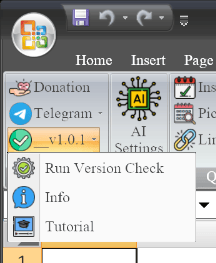
The tool will run a diagnostic and display a report showing:
- Your Operating System architecture (32-bit or 64-bit)
- Your Microsoft Office architecture (32-bit or 64-bit)
- Your MFU add-in architecture (32-bit or 64-bit)
- Your system language settings
- Whether everything is compatible
What It Checks
| Component | What It Verifies |
|---|---|
| Operating System | Architecture (32-bit or 64-bit) |
| Microsoft Office | Architecture (32-bit or 64-bit) |
| MFU Add-in | Architecture (32-bit or 64-bit) |
| Language | Consistency between OS and Office |
Why This Matters
For the add-in to work correctly:
- ✅ Your OS, Office, and MFU add-in should all have the same architecture (all 32-bit or all 64-bit)
- ✅ Your OS and Office should preferably have the same language settings
If there’s a mismatch, you may experience errors or unexpected behavior. The Version Check helps you identify and fix these issues quickly.