AGGREGATE function was officially introduced with Office 2010, but thanks to MFU you can now run it on your 2007 version. It works exactly as its original MS counterpart.
Description
The AGGREGATE function returns the aggregate calculation (such as SUM, AVERAGE, MAX, MIN, etc.) from a list or database, with the option to ignore hidden rows and error values.
It’s more powerful than SUBTOTAL because it offers more calculation options and the ability to ignore errors, making it ideal for working with datasets that contain #N/A, #DIV/0!, or other error values.
Syntax
=AGGREGATE(function_num, options, ref1, [ref2], ...)
| Argument | Description |
|---|---|
function_num | A number from 1 to 19 specifying the calculation to perform (see table below) |
options | A number from 0 to 7 specifying which values to ignore (see table below) |
ref1 | The first range or array to aggregate |
ref2 | Optional. Additional ranges or arrays |
Function Numbers
| Number | Function |
|---|---|
| 1 | AVERAGE |
| 2 | COUNT |
| 3 | COUNTA |
| 4 | MAX |
| 5 | MIN |
| 6 | PRODUCT |
| 7 | STDEV.S |
| 8 | STDEV.P |
| 9 | SUM |
| 10 | VAR.S |
| 11 | VAR.P |
| 12 | MEDIAN |
| 13 | MODE.SNGL |
| 14 | LARGE |
| 15 | SMALL |
| 16 | PERCENTILE.INC |
| 17 | QUARTILE.INC |
| 18 | PERCENTILE.EXC |
| 19 | QUARTILE.EXC |
Options
| Number | Behavior |
|---|---|
| 0 | Ignore nested SUBTOTAL and AGGREGATE functions |
| 1 | Ignore hidden rows |
| 2 | Ignore error values |
| 3 | Ignore hidden rows and error values |
| 4 | Ignore nothing |
| 5 | Ignore hidden rows |
| 6 | Ignore error values |
| 7 | Ignore hidden rows and error values |
Examples
Basic SUM ignoring errors:
=AGGREGATE(9,6,I2:I17)
Returns the SUM of values in I2:I17, ignoring any error values.
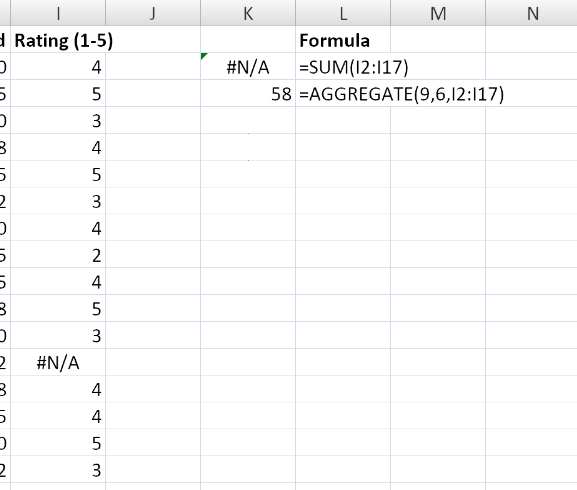
AVERAGE ignoring hidden rows:
=AGGREGATE(1,5,B2:B100)
Returns the AVERAGE of visible cells only in B2:B100.
MAX while ignoring errors and hidden rows:
=AGGREGATE(4,7,C2:C100)
Returns the MAX value in C2:C100, ignoring both errors and hidden rows.
Notes
- ℹ️ The function is not fully tested yet