Download
📥 Download: Click here 👈
💾 Alternative Links: Google Drive | Telegram
📚 Guide:
Price:
- ✅ FREE – Donations: click here!
If you regularly use ChatGPT, Claude, Gemini, or other AI tools to draft documents, you have likely noticed an annoying side effect when pasting that text into Microsoft Word: hidden formatting artifacts, weird spacing, and invisible characters.
While these glitches might not always be obvious on screen, they can ruin your document’s layout, mess up copy-pasting into other platforms, or clearly signal that a text was generated by an AI. Also, these characters are used by AI detectors, and I am quite sure you would like to get rid of them in an efficient way.
To solve this everyday headache, I built AI Corrector—a lightweight, ready-to-use Microsoft Word template designed to scrub your documents clean in seconds.
What AI Corrector Does?
AI Corrector acts as a quick cleanup filter directly inside Word, automatically detecting and removing the digital clutter left behind by AI text generators:
- Invisible Characters: Strips out zero-width spaces and hidden markers that break word wrapping and search functions.
- Formatting Artifacts: Removes stray non-breaking spaces, unusual dashes, and leftover Markdown symbols.
- Instant Workflow: No complicated setup or external software required—just open the file and clean your text.
How to Get Started
AI Corrector is completely free, and the source code is publicly available on the file itself for transparency and security review.
- Download from the link above at the top of the page .
- Extract the
.ziparchive to a folder on your computer. - Right-click the extracted Microsoft Word file and select Properties.
- At the bottom of the General tab, check the Unblock box, then click OK.
- Open the file in Microsoft Word—you are ready to go!
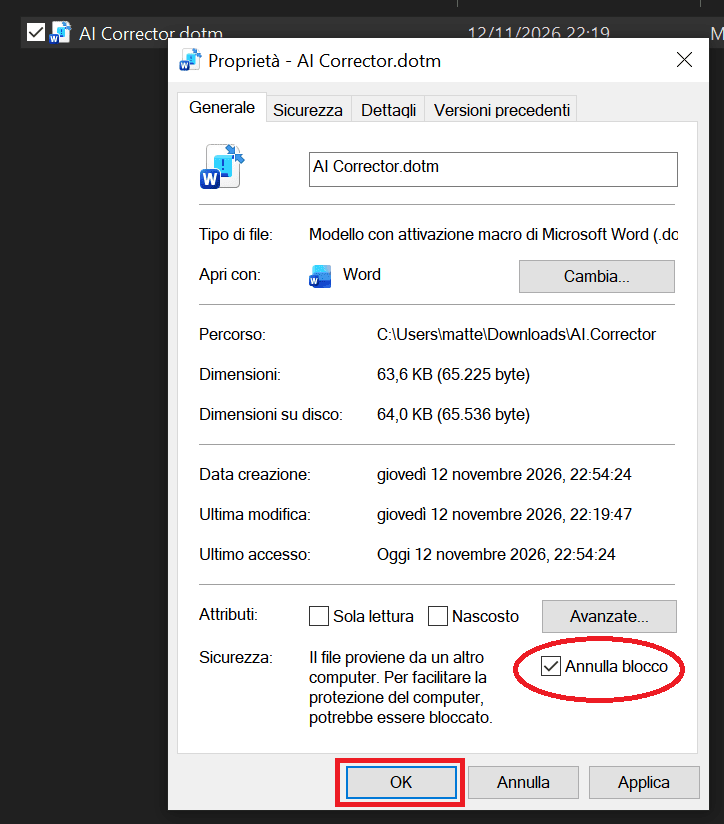
Microsoft automatically blocks macro-enabled files downloaded from the internet. Again, once you have the file, you can check the code or copy paste it and ask AI to do the job. No password protection. Easy VBA code to read.
Chees!