The XOR function was officially introduced with Excel 2013, but thanks to Modern Functions Update (MFU) you can now run it on your Excel 2007 & 2010 versions. It works exactly as its original Microsoft counterpart.
Description
The XOR function returns a logical exclusive OR of all arguments.
The result of XOR is:
TRUEwhen the number ofTRUEinputs is oddFALSEwhen the number ofTRUEinputs is even
This is particularly useful for:
- Complex logical tests: Checking if an odd number of conditions are met.
- Data validation: Ensuring that an odd number of criteria are true.
- Conditional formatting: Highlighting cells based on odd/even true conditions.
- Mutually exclusive scenarios: Validating that exactly one or an odd number of options are selected.
Syntax
=XOR(logical1,[logical2],...)
| Argument | Description |
|---|---|
logical1 | The first condition or value to evaluate. |
logical2 | Optional. Additional conditions or values to evaluate. |
Examples
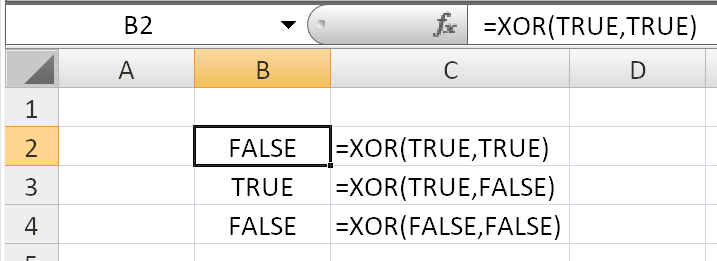
Basic Usage
=XOR(TRUE,TRUE)
Returns: FALSE (2 TRUEs – even)
=XOR(TRUE, FALSE)
Returns: TRUE (1 TRUE – odd)
=XOR(TRUE, TRUE, TRUE)
Returns: TRUE (3 TRUEs – odd)
=XOR(3>12, 4>6)
Returns: FALSE (0 TRUEs – even, and as Microsoft notes: at least one test must evaluate to TRUE to return TRUE)
With Cell References
If:
- A1 = 10
- B1 = 20
- C1 = 10
Then:
=XOR(A1>5, B1>15, C1>5)
All three conditions are TRUE (3 TRUEs – odd), so it returns TRUE.
But:
=XOR(A1>5, B1>15, C1>15)
Two conditions are TRUE (A1>5 and B1>15) – 2 TRUEs (even), so it returns FALSE.
With the IF Function
Combine XOR with IF:
text
=IF(XOR(A1>10,B1>10),"Odd number of conditions are true","Even number of conditions are true")
Practical Example: Employee Shift Validation
If you have three shifts (Morning, Afternoon, Night) and you want to check that an employee is assigned to an odd number of shifts (typically 1 or 3):
=XOR(Morning=TRUE,Afternoon=TRUE,Night=TRUE)
- Returns
TRUEif assigned to exactly 1 shift or all 3 shifts - Returns
FALSEif assigned to 0 or 2 shifts
With Arrays
XOR can also be used with arrays:
=XOR(A1:A10>10)
Returns TRUE if an odd number of cells in the range A1:A10 contain values greater than 10.
Practical Use Cases
| Scenario | Benefit |
|---|---|
| Quality control | Check that an odd number of conditions are met |
| Data validation | Ensure an odd number of options are selected |
| Workflow rules | Validate that a process step has an odd number of true states |
| Financial models | Test odd/even patterns in scenarios |
| Project management | Verify that a task has an odd number of assignees or statuses |
Notes
- ✅ Fully tested – The implementation in Modern Functions Update works identically to Microsoft’s original function introduced in Excel 2013.
- ✅ The function is fully compatible with Excel 2007, 2010, and all later versions.
- ℹ️
XORcan handle up to 254 logical arguments. - ℹ️ If an array or reference argument contains text or empty cells, those values are ignored.
- ℹ️ If the specified range contains no logical values,
XORreturns the#VALUE!error. - ℹ️ The function evaluates logical values only; arrays must contain logical values.
See Also
IFNA– Handles#N/Aerrors gracefully